

Add to Wish List

DJ.Studio
DJ.Studio Studio - ESD
Earn 99 Loyalty Points
SKU: 1246-3182
You Might Also Like
Ask anything about this product
Product Description
DJ.Studio Studio is an intuitive, timeline-based DJ mixing platform that lets you build polished DJ sets, radio shows and video mixes entirely on your laptop, with no decks or controllers required. From discovering tracks and arranging playlists through to detailed transition editing and exporting, it gives you a complete studio-style workflow tailored specifically for DJs.
Instead of recording mixes in real time, DJ.Studio Studio lets you design them with precision on a visual timeline. You can instantly re-order tracks, tweak transitions, and fix mistakes without having to re-record a full set, saving hours of work while giving you a level of control that is almost impossible in a live environment. Whether you are preparing a party playlist, a podcast-style radio show, or a warm-up mix for a club gig, you can move quickly from idea to finished product.
With deep library integration, AI-powered Automix and an intuitive mix editor, DJ.Studio Studio makes it easy to create seamless, harmonically matched mixes even if you are new to DJing. Connect your existing music libraries, drag and drop tracks into a project, then let the software suggest the best order and transitions based on tempo and key. From there, you can refine every detail or simply hit export and share your mix with the world.
For more creative users, the manual automation tools and video engine open up advanced possibilities. Shape complex transitions using EQ, volume and effects automation, or add audio-reactive visuals, text and artwork for video exports that are ready for platforms like YouTube and Mixcloud. All of this runs on a modern Mac or Windows laptop, with offline working and support for a wide range of file formats.
Timeline-Based DJ Mixing For Total Control
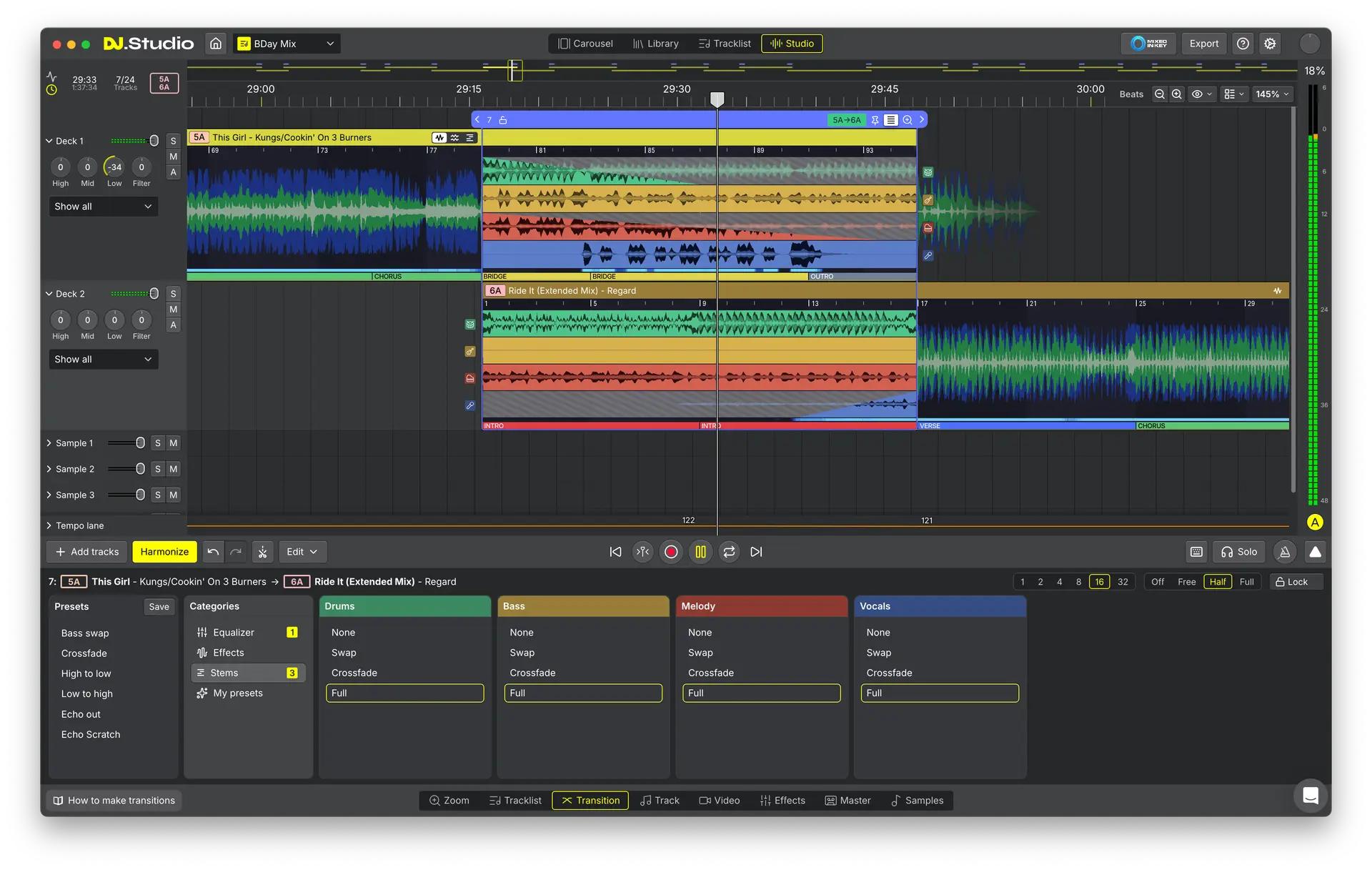
DJ.Studio Studio replaces traditional live recording with a clear, visual timeline, so you can see and edit your entire mix at a glance. Cut, duplicate and move sections, fine-tune mix-in and mix-out points, and adjust transitions without the pressure of performing in real time. This lets you focus on creativity and storytelling, while ensuring every transition sounds exactly how you want it.
AI-Powered Automix For Instant, Harmonic Playlists
The built-in AI Automix Assistant analyses your tracks and uses millions of calculations to arrange them by tempo and key. It automatically beat-syncs songs, chooses musically compatible transitions and lets you set starting and ending tracks, transition lengths and mix points. This gives you professional, harmonically mixed playlists in minutes, ideal for parties, workouts, journeys or quick mix preparation.
Deep Library Integration And Flexible Import
Connect DJ.Studio Studio to your existing music ecosystem and start mixing straight away. It works with local files and popular DJ and music libraries including rekordbox, Serato, Traktor, Engine DJ, Virtual DJ, Mixed In Key, Apple Music and iTunes, as well as online sources like Beatport and Beatsource. Supported formats include WAV, AIFF, AIF, M4A and FLAC, so you can build projects from the music you already own and use.
Video Visuals And Easy Export For Sharing
The integrated video engine lets you turn your mixes into engaging visual content with audio-reactive animations, transitions, album art, text and effects. Choose from a large selection of reactive animations and 3D Shadertoy graphics, then export as an MP3, low-quality video file, DJ set playlist or Mixcloud upload. You can also export M3U playlists and DJ sets with cue points for use in rekordbox, making it easy to move between studio preparation and live performance.
Features
- AI Automix Assistant - Automatically orders your tracks by tempo and key, sets beat-matched transitions and ensures harmonic compatibility between songs. This dramatically speeds up mix creation and helps you achieve smooth, musical blends even if you are still learning the craft.
- Intuitive Timeline Mix Editor - The Studio view gives you a clear timeline where you can edit transitions, automate BPM, and apply presets for volume, EQ and effects. You can cut, duplicate and move segments to sculpt your mix with a level of precision that is difficult to achieve in a live set.
- Audio-Reactive Video Engine - Add visual impact to your mixes with built-in audio-reactive visuals, animations and 3D graphics. Customise artwork, text and transitions, then export ready-made video files that are ideal for sharing online or building a visual identity around your DJ sets.
- Broad Library And Format Support - Import tracks via drag and drop from local folders or connect directly to leading DJ platforms and streaming services. With support for popular file formats and offline working, you can build and refine mixes wherever you are, using the music libraries you already rely on.
Specifications
Core Features
- Timeline-based Studio view with BPM automation
- AI Automix Assistant for tempo and key-based ordering
- Carousel and Studio timeline editors for transition refinement
- Manual automation editor for EQ, volume, effects and more
- Transition presets with curves and styles
- Cut, duplicate and move segments within tracks
- Audio-reactive video engine with animations, transitions and effects
- Over 100 reactive animations and more than 30,000 3D Shadertoy graphics
- Drag and drop track import and editing
- Work offline
Studio View Functions
- Change and automate BPM
- Edit transitions between tracks
- Use default transition presets
- Create video visuals for mixes
Export Options
- MP3 audio files
- Low-quality video files with chapter information
- DJ set export as M3U playlist
- Mixcloud upload
- Export DJ sets with cue points for rekordbox
- Re-pitch audio
Supported Libraries And Sources
- Local file downloads
- rekordbox
- Mixed In Key
- Serato
- Engine DJ
- Virtual DJ
- Apple Music
- Traktor Pro
- iTunes
- Beatport (online streaming for mixes)
- Beatsource (online streaming for mixes)
Supported File Types (Import)
- WAV
- AIFF
- AIF
- M4A
- FLAC
Mac System Requirements
- OS: OS X Big Sur 11 or higher
- Memory: 8 GB RAM
- Disk Space: 4 GB
- CPU: Intel Core processor (newer than 2017) or Apple Silicon
Windows System Requirements
- OS: Windows 10 or higher
- Memory: 8 GB RAM
- Disk Space: 4 GB
- CPU: Intel or AMD Core processor (newer than 2017)
