

Add to Wish List

DJ.Studio
DJ.Studio Pro + Stems - ESD
Earn 169 Loyalty Points
SKU: 1246-3184
You Might Also Like
Ask anything about this product
Product Description
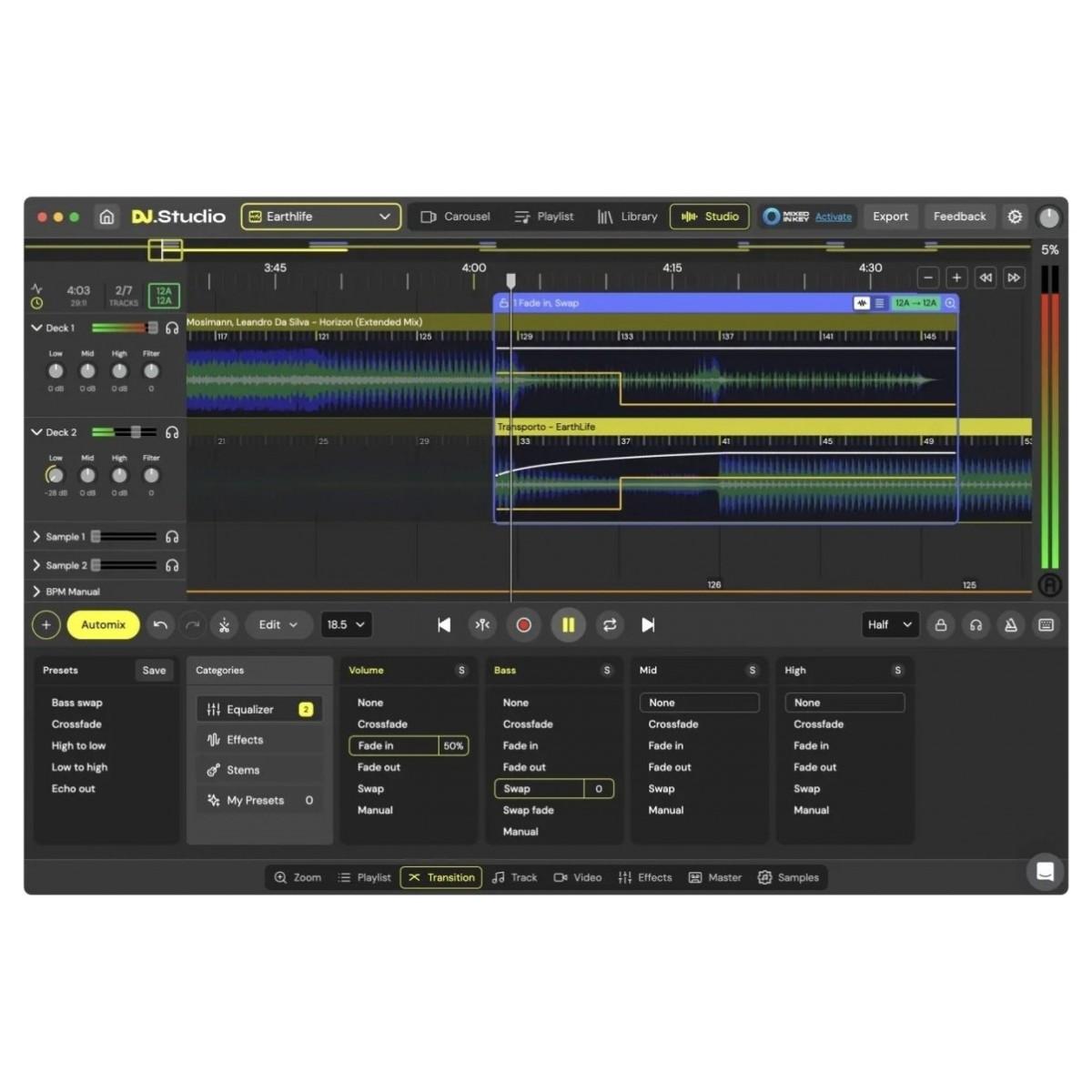
DJ.Studio Pro + Stems is a powerful, timeline-based DAW editor created specifically for DJs, letting you build polished, studio-quality mixes faster and with more control than traditional decks. With award-winning Automix technology, deep integration with leading DJ platforms, and onboard stem separation, it turns your existing library into a playground for seamless transitions, mashups, radio shows, podcasts, and video mixes.
Whether you are a bedroom DJ, a radio producer, or a touring artist, DJ.Studio Pro + Stems helps you move from idea to finished mix in a fraction of the time. Import playlists from rekordbox, Serato, TRAKTOR, Engine DJ, VirtualDJ, iTunes and more, then refine every transition on a visual timeline. When you are ready, export as audio, video, Ableton projects or performance-ready playlists and share your work directly to platforms like YouTube and Mixcloud.
AI-Powered Stem Separation Included
This Pro + Stems edition unlocks DJ.Studio’s integrated stem separation, letting you split any track into vocals, drums, bass and melodies inside the DAW. Powered by advanced machine learning, it delivers high-quality stems in near real time, so you can clean up clashing drums, drop out vocals for instant instrumentals, or layer basslines from one tune under the acapella of another. With Stems 4 Ableton export, you can send four warped stem files straight into Ableton Live with a single click, ready for deeper production and remix work.
Automix That Actually Sounds Like You
Automix in DJ.Studio analyses tempo, key and energy using harmonic principles inspired by the Camelot Wheel, then auto-orders your playlist for smooth, musical flow. It reads your existing libraries, analyses BPM and key on import, and lets you set preferences for transition length, mix-in points and matching by tempo, key or both. You can let Automix build a complete set in minutes, then jump into the timeline to tweak transitions, adjust track lengths and refine details until it sounds exactly how you want.
Timeline Control for Precision Transitions
Instead of being limited to live crossfaders, DJ.Studio gives you a full DAW-style timeline where you can design transitions with surgical precision. Choose from transition presets for quick results or draw your own automation curves for volume, EQ and effects. Stack multiple effects, create complex bass swaps and filter sweeps, lock in your favourite transitions to avoid accidental edits, and group tracks into sections for cohesive, story-driven sets. The result is a level of polish that is extremely difficult to achieve in a single live take.
Fits Straight into Your Existing Workflow
DJ.Studio is built to sit at the centre of your DJ and production workflow. It connects with Mixed In Key, major DJ libraries and your local music folders, so you can keep using the tools you already rely on. The Sample Lane Editor lets you add jingles, tags, sweeps and FX independently of your main tracks, with their own automation and processing. You can trim sections, create loops, and build extended edits, then export your work as audio files, video mixes, Ableton projects or performance playlists for your preferred DJ software.
Create, Share and Grow Your Audience
With built-in YouTube search and playlist import, DJ.Studio makes it easy to experiment with new music, test ideas and turn entire playlists into structured DJ sets. You can share mixes via simple URLs or QR codes, tap into the DJ.Studio Mix Community for inspiration and feedback, and quickly add tracks you discover into your own library. When it is time to publish, export audio mixes, 4K video sets with audio-reactive visuals, or detailed projects for rekordbox and Ableton, complete with tracklists, timestamps and transition markers to support both online content and live performance.
Features
- Integrated DJ-Grade Stem Separation - Split any track into vocals, drums, bass and melodies directly inside DJ.Studio, giving you full control for mashups, remixes and ultra-clean transitions. Machine-learning separation delivers professional-quality stems in near real time, so you can remove clashing elements, build genre-blending edits and save isolated parts for future projects.
- Award-Winning Automix and Harmonic Intelligence - Automix uses tempo and harmonic analysis inspired by the Camelot Wheel to auto-order your playlist and suggest smooth, musical transitions. Set your own rules for track order, transition length and mix-in points, then let the software handle beat and key matching so you can focus on creative decisions rather than technical firefighting.
- Timeline-Based DAW Editor for DJs - Work on a visual timeline where you can fine-tune every transition, automate EQ and effects, and lock in your favourite moves. Transition presets speed up your workflow, while detailed automation lets you design complex blends that go far beyond simple crossfades, ideal for radio shows, podcasts and release-ready mixtapes.
- Deep Integration and Flexible Export - Connect to rekordbox, Serato, TRAKTOR, Engine DJ, VirtualDJ, iTunes, Mixed In Key and more for fast track import and library management. Export as audio files, video mixes with reactive visuals, Ableton Live projects with stems and automation, or performance playlists and cue-marked projects for your DJ software, so your work translates seamlessly from studio to stage.
Specifications
System Requirements
- Operating System (Mac): macOS 14 Sonoma (updated to the latest version) up to macOS Tahoe
- Operating System (Windows): Windows 10 or higher
- Memory: 16 GB RAM or more
- CPU (Mac): Intel Core i7 or newer, and Apple Silicon M-series chips from M1 to M5
- CPU (Windows): Intel or AMD Core processor newer than 2017
- Hard Disk Space: 4 GB or more of free space
- Sound: Internal or external audio device
- Display: 1280 × 768 resolution or greater
- Audio File Compatibility: ALAC, FLAC, WAV, AIFF, MP3, AAC
- Internet Connection: Required to create a DJ.Studio account and to download and run the software
