

Add to Wish List



Steinberg
Steinberg DAC WaveLab Elements 13
Next Generation Mastering Software
Earn 80 Loyalty Points
SKU: 92580
You Might Also Like
Product Description
Steinberg WaveLab Elements 13 is a powerful, streamlined mastering and audio editing suite that brings the core of Steinberg’s flagship WaveLab platform to project studios, content creators and musicians. With a modern interface, intuitive workflows and a suite of high-quality plug-ins, it gives you the tools to polish mixes, restore problem audio, prepare podcasts and create professional masters ready for any platform.
From precise clip editing and spectral work to loudness-compliant mastering and flexible metadata handling, WaveLab Elements 13 is built to help you work faster and sound better. The updated MasterRig 2 suite, dynamic clip tools and smart colour management make it easier than ever to stay creative while keeping full technical control over your audio.
Mastering and Audio Editing Made Accessible
WaveLab Elements 13 distils Steinberg’s global mastering standard into a focused, accessible package. Dedicated workspaces for detailed audio editing and multitrack montage let you refine individual files or assemble full projects with ease. Whether you are tightening up a stereo mix, compiling an EP or preparing stems for distribution, the workflow is designed to be clear, efficient and reliable.
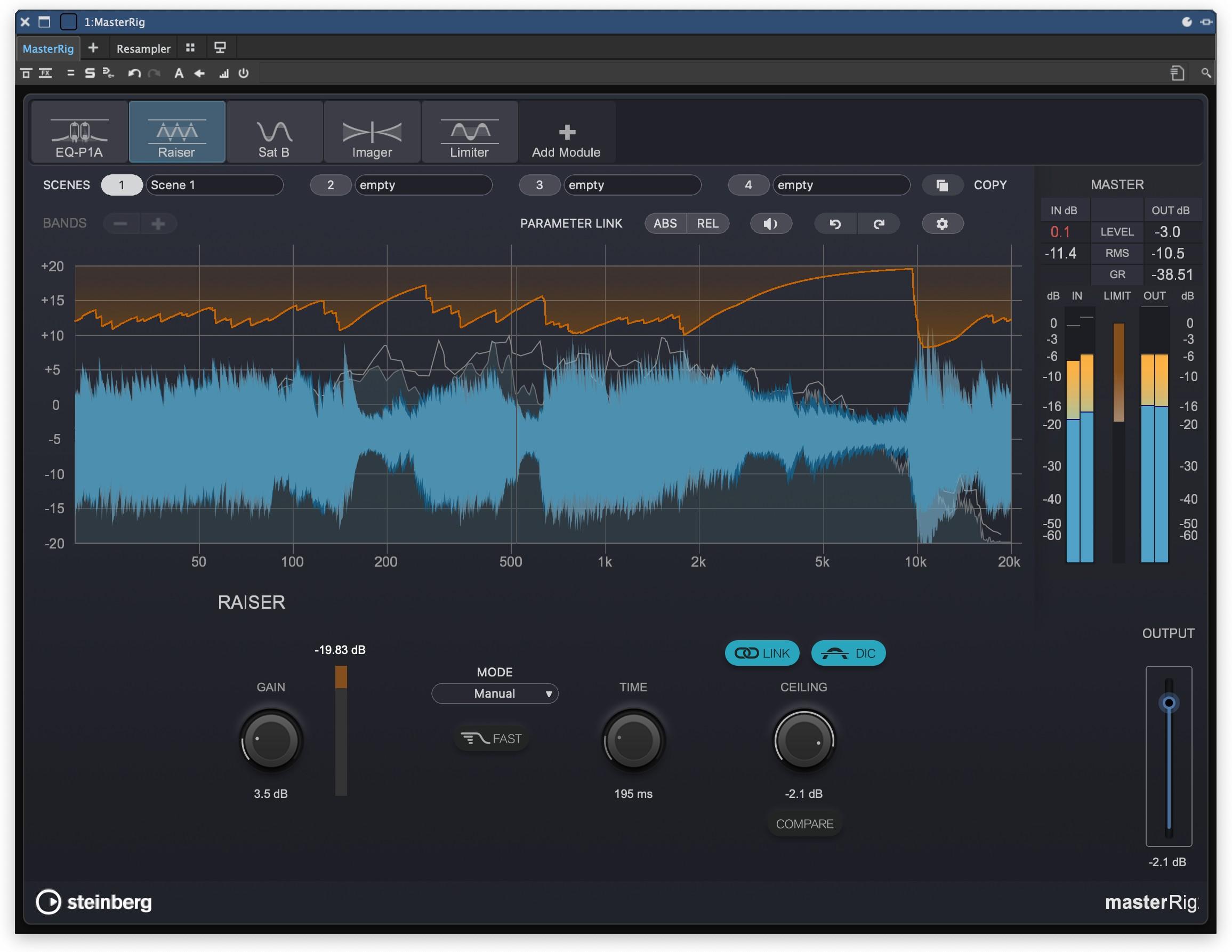
Next-Generation MasterRig 2 Suite
For the first time in WaveLab Elements, you get MasterRig 2, Steinberg’s next-generation mastering plug-in suite. This modular collection of high-quality processors gives you powerful tone shaping, dynamics control and final polish inside a single, integrated environment. It lets you build sophisticated mastering chains that stay flexible and easy to manage, so you can focus on musical decisions rather than juggling multiple plug-in windows.
Fast, Clip-Focused Editing
WaveLab Elements 13 introduces a dynamic clip toolbar that puts clip-related commands directly under your mouse, cutting down on menu diving and speeding up everyday tasks. You can now remove plug-ins simply by dragging them out of their slot, and adjust clip gain pre or post effects via handy pop-up sliders. The result is a smoother, more tactile editing experience that keeps you in the flow when fine-tuning levels, transitions and processing.
Creative Visual Workflow
Colour management in WaveLab Elements 13 lets you assign random colours to tracks at the click of a button, making complex projects easier to navigate at a glance. Combined with WaveLab’s visual metering and analysis tools, this helps you keep a clear overview of your sessions, quickly identify different elements and stay organised as projects grow in size and complexity.
Features
- MasterRig 2 Mastering Suite Included - WaveLab Elements 13 now includes the updated MasterRig 2 plug-in, bringing a modular, high-end mastering environment into your projects. With multiple processors available in one flexible interface, you can sculpt tone, control dynamics and add final polish without leaving your main workspace.
- Dynamic Clip Toolbar for Faster Editing - The new dynamic clip toolbar gives instant access to clip-related menus and functions directly where you are working. This reduces clicks and menu navigation, helping you edit, trim and process clips more quickly so you can stay focused on the sound.
- Drag and Drop Plug-In Removal - Plug-ins can now be removed from a slot simply by dragging them outside it. This intuitive gesture speeds up managing your processing chains, making it easy to experiment with different plug-in combinations and keep your mastering chain tidy.
- Quick Pre and Post Clip Gain Adjustment - Pop-up gain sliders let you adjust clip levels either before or after effects in seconds. This makes it straightforward to optimise levels into processors, balance clips against each other and fine-tune loudness without constantly reaching for additional plug-ins.
Specifications
General
- Product: Steinberg WaveLab Elements 13
- Application Type: Audio mastering and editing software
- Included Mastering Suite: MasterRig 2
- Clip Tools: Dynamic clip toolbar, drag and drop plug-in removal, quick clip gain adjustment (pre and post effects)
- Visual Workflow: Track colour management with random colour assignment
System Requirements (Mac)
- Operating System: macOS Tahoe, macOS Sonoma, macOS Sequoia
- Processor: Intel Core i5 (late 2018) or Apple silicon
- CPU Cores: 4 cores or more
- RAM: 8 GB
- Free Storage Space: 84 GB
- Graphics: Graphics card with Metal support
- Audio Hardware: OS compatible audio hardware
- Recommended Audio Hardware: ASIO compatible device for low latency performance
- Additional: Internet connection required for download, licence activation, account setup and registration
System Requirements (Windows)
- Operating System: Windows 11 (version 24H2 or higher) 64 bit, Windows 10 (version 22H2 or higher)
- Processor: Intel Core i5 Series (8th generation) or AMD Ryzen Series 3000
- CPU Cores: 4 cores or more
- RAM: 8 GB
- Free Storage Space: 84 GB
- Graphics (Minimum): Graphics card with native Windows 10 support (Microsoft Basic Display driver not recommended)
- Graphics (Recommended): AMD R or RX series and later, or NVIDIA Series 700 and later
- Audio Hardware: OS compatible audio hardware
- Recommended Audio Hardware: ASIO compatible device for low latency performance
- Additional: Internet connection required for download, licence activation, account setup and registration
