

Add to Wish List








Steinberg
Steinberg DAC SpectraLayers Pro 13 Education Version for Students & Teachers
UK Delivery - From £2.99
Earn 169 Loyalty Points
Want to Click and Collect or try items at our Guildford Store?
The store is open 10am - 6pm Monday to Saturday and 11am - 5pm Sunday and bank holidays.
The stock information shows the quantity of units that are available to purchase at the Guildford store and the quantity of units that are available at our off-site Guildford warehouse. These stock levels are updated in real time.
Our Click and Collect service is available at our Guildford store from 10am - 6pm Monday to Saturday, and 11am - 5pm on Sunday. You can either choose Click and Collect as your delivery option online or, during store opening hours, call our sales team on 01483 456777 for assistance with placing your order.
If you have placed your order online, you will receive a confirmation email of your order and a separate follow-up text or email to confirm when your item is ready for collection.
Please do not come to the store before you have received the follow-up message, as your order may not yet be ready at the store.
If the only available stock is in our off-site warehouse it can be brought to the store location for you to try - you just need to contact the store within opening hours. Please note any requests received after 3.30pm will not arrive at the store until the following morning.
Please be aware that stock availability can change quickly both online and in-store, so we would always recommend placing your Click and Collect order as soon as possible to reserve your item.
SKU: 1527-210
You Might Also Like
Ask anything about this product
Product Description
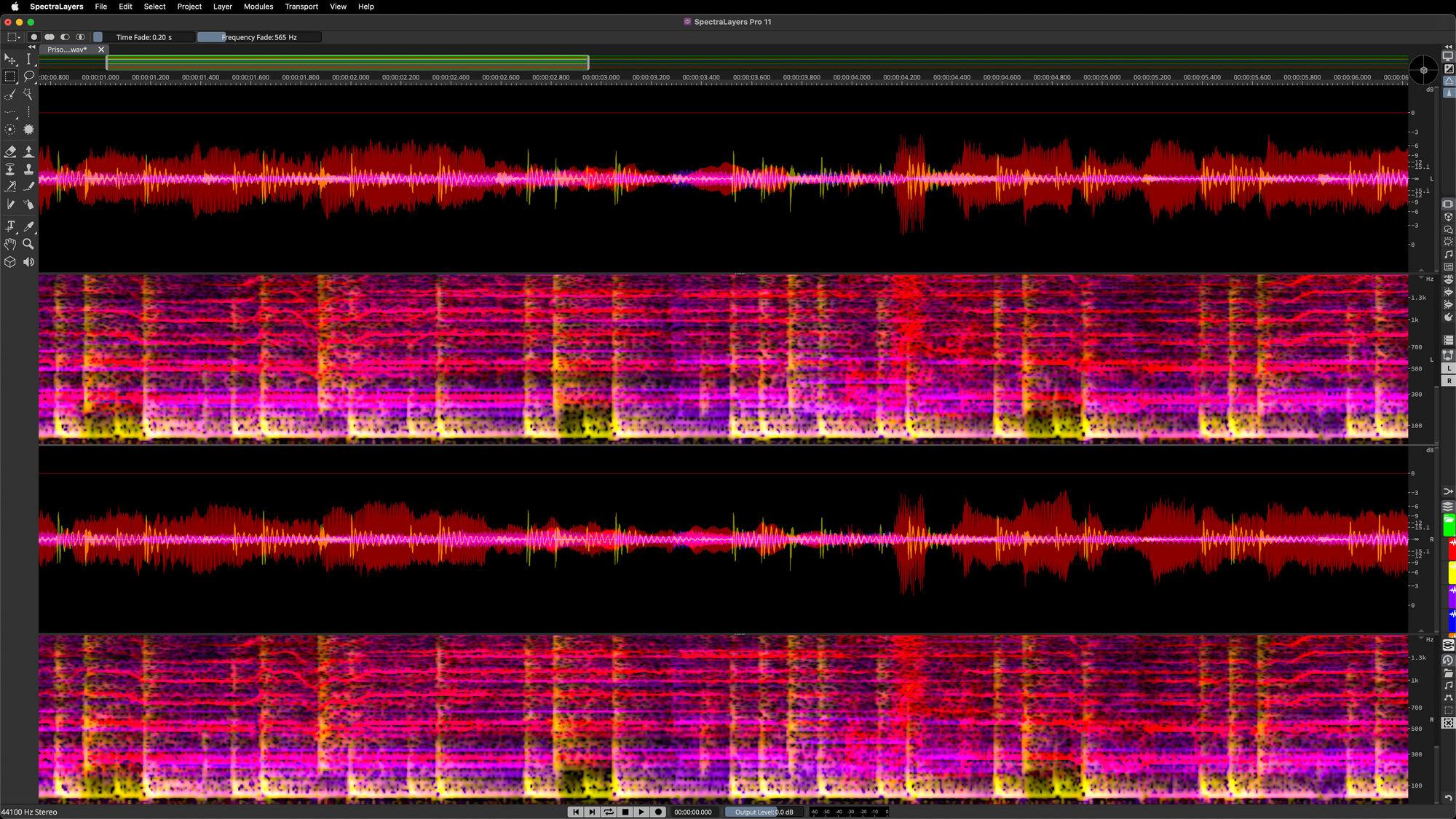
SpectraLayers delivers audio empowerment by showing sounds as visual objects. You can explore, reach in, take and transform, working wonders on tasks ranging from repairing and restoring audio to freeform sound design. Unmatched selection tools developed over many years are now joined by new artificial intelligence-driven audio extraction and repair processes, making this the most significant version of SpectraLayers yet.
SpectraLayers 13 builds on the application’s core strengths with powerful new post-production options and workflow enhancements that span the entire application. Working in the spectrum is now more flexible than ever, while new tools for creative unmixing, speech refinement, audio reconstruction, and noise control make this edition ideal for contemporary workflows.
Here's a taster of what's new:
Unmix Sound Effects
This new process separates short sounds from continuous environmental and ambient background sounds, such as wind, crowd, traffic, and nature. Ideal for audio post, it enables fast, precise isolation of a very wide range of sounds, extracting them to their own dedicated layer while retaining the background texture. This can then be shaped and smoothed using other new processes in this version.
Ambience Heal
Automatically fill empty spaces in the audio spectrum left by unmixing and cut-to operations. For example, empty spaces previously occupied by voices on a source layer can be filled with the surrounding background texture (environment, room tone, etc) already present in the layer. The process references user-designated foreground layers containing content extracted from the source layer.
Reconstruct
This new module resynthesizes selected spectral data. It analyzes and reconstructs tones (by tracking before and after selections), transients (by tracking above and below selections), and noise. Reconstruction amounts are configurable for all three components.
Attenuate
Attenuate relatively high-amplitude content within selections, based on the maximum spectral power of the surrounding content. This facilitates easy, natural-sounding blending with selection-adjacent content.
Voice DeClick
Remove unwanted mouth noises, such as lip smacks and tongue clicks. Threshold, pixel width, and reduction ratio controls are provided for fine-tuning the process.
Unmix Two Voices
Automatically separate two voices without having to register voice profiles. This is one of the workflow speed and efficiency improvements which are a hallmark of the new edition.
Voice DeCrosstalk
Separate non-target voices (background or foreground) from the primary voice, even when they are overlapping. Speech unmixing has never been easier!
Level Check
Quickly calculate and display a variety of loudness data, including True Peak and a host of LU measurements. Calculations update automatically and can be made on spectral selections, as well as any combination of layers. In addition, clicking on various fields in the module interface makes the playhead snap to the exact project locations where instantaneous data was gathered.
Fade
Apply fades to selections within single layers, or crossfade between two selected layers in a project. Choose fade in, fade out, or let the module automatically determine the fade type, based on the selection location in the timeline. Four fade types are provided.
Improved DeNoise
Noiseprint-based noise reduction is alive and well! This classic SpectraLayers process is now improved with the addition of controls which add increased precision and variable spectral smoothness.
Improved Unmix Components
It’s a sound designer’s delight! This process is now improved to provide more accurate detection and separation of discrete tones, transients, and noise.
Features
- The vanguard of spectral editing applications
- Touch, sculpt, and shape audio on a spectral graph
- Automatic, artificial intelligence-driven processes
- From repair and restoration to freeform music creation
Artificial Intelligence. Sensory Integration
Looking at audio on a spectrograph display is one thing, but the ability to easily touch, sculpt and shape what you see is what sets SpectraLayers apart. And now you have a skilled, highly trained AI partner that can sense patterns, perform operations and speed you on your way to perfect audio.
A foundation for AI-enhanced processing
The manual selection tools in SpectraLayers allow everything from broad brush editing to microscopic intervention. AI-assisted processes bring even more speed and precision, making the SpectraLayers tool set and layers-based workflow more powerful and flexible than ever.
From pure science to free improvisation
Use AI speed and precision to split a sample into layers and create freeform mixes. Automatically unmix tracks into stems, and stems into component parts. Quickly identify, isolate, and work on the tone, transients and noise signatures of extracted instruments. Do you make experimental music? Get granular and mold sound with surgical precision in SpectraLayers. It’s a freeform music creation tool… a genuine musical instrument.
Repair and restore
Find and erase errors and unwanted sounds, reduce noise, repair clips, remove clicks, tame transients and much more — manually or automatically — with the new AI-assisted processes in SpectraLayers. Work with speed and precision, and enjoy the satisfaction as you routinely salvage tracks and perform audio enhancements in ways you never thought possible.
The ARA era
Today’s audio production platforms need to work in both the waveform and spectral domains. What engineers want is serious application power, coupled with the flexibility to deliver the best in creative options, accessibility and workflow. Thanks to advanced ARA 2 technology, which is designed to build bridges between audio editing applications, SpectraLayers can be launched inside Nuendo, Cubase and a host of applications from other developers to provide comprehensive, non-destructive visual editing right on the DAW timeline.
Audio refabrication
Use high-precision tools to make super-detailed audio selections on the spectral display. Extract this material to independent layers for processing, in SpectraLayers or anywhere in the DAW ecosystem. Mix and render, or keep your edits preserved on the DAW timeline. With ARA 2 support, you can launch SpectraLayers directly into the Cubase/Nuendo waveform display window for the ultimate in real-time program integration.
Your personal pathway
SpectraLayers delivers AI-assisted spectral editing capabilities and seamless DAW integration. The entry-level Elements edition can perform precise error correction and includes automatic noise and hum reduction processes, as well as selected AI-assisted processes including vocal unmixing. The Pro edition features more comprehensive tools, along with the most sophisticated AI implementation. Now with second-generation AI and enhanced ARA 2 support, SpectraLayers is a standalone powerhouse and a superb extension for Cubase and Nuendo, bringing SpectraLayers magic directly into the DAW timeline.
Specifications
- File import: AAC, AC3, AIFF, ALAC, AU, CAF, FLAC, MP3, OGG, Opus, RAW, WAV, WMA
- File export: AAC, AC3, AIFF, CAF, FLAC, MP3, OGG, Opus, RAW, WAV
- Maximum Sample Rate: 384 kHz
- Maximum Number of Channels: 16
- Meta Data Editing: Yes
- Markers Editing: Yes
- Plugin formats: ARA2 VST, ARA2 AAX, AAX Plug-in
- Maximum Number of Layers: Unlimited
System requirements
- Operating systems (Windows): 64-bit Windows 10 Version 21H2 (or higher), 64-bit Windows 11 Version 21H2 (or higher)
- Operating systems (Mac): macOS Sonoma, macOS Sequoia, macOS Tahoe
- Apple silicon–based Mac@ Rosetta 2 App, Native App: CPU minimum (Windows): Intel® Core™ i5 (4th Generation) or AMD Ryzen™ or Qualcomm Snapdragon™ X
- CPU minimum (Mac): Intel® Core™ i5 (mid 2013 or later) or Apple silicon
- RAM minimum: 8 GB
- RAM recommended: 16 GB
- Hard disk free space: 8 GB
- Display resolution minimum at 100% UI scaling: 1920 x 1080
- Graphics minimum (Windows): DirectX 11 compatible graphics card (DirectX 12 recommended for AI processing)
- Graphics (Mac): Graphics card with OpenGL 3.3 support
- OS compatible audio hardware: Yes
- Internet connection for: account sign up and product registration, installer download, license activation
Related Categories
Brands, Recording, Steinberg, Music Software, Steinberg Software, Audio Editing & Mastering Software